Temporary Group Location Sharing: 5 Ways
The best way to share your location with a group temporarily is a tool that stops on its own. Pick something scoped to the event — a trip, a drive, a meetup — rather than an open-ended share you have to remember to switch off. Messaging apps handle one-to-one sharing well and scale badly past a few people.
The short version
- Scope beats intent. Sharing that ends by itself is safer than sharing you plan to turn off later.
- Group chat works for two or three people and gets noisy fast past six.
- Precise location on Android is usually accurate to about 50 meters; approximate is a blur roughly 3 square kilometers wide.
- Ask who stores it. The FTC has ordered data brokers to stop selling precise location data.
- For a group in cars, a drive-scoped live map holds up to 20 people at $0 and ends when the drive does.
Every one of us has an abandoned location share sitting in some group thread from a trip that ended years ago — still on, still broadcasting to people we barely talk to now. Sharing that outlives the reason for it is the normal outcome, not the exception, which is why we scoped Vamio’s sharing to a single drive instead of trusting anyone to remember.
What’s the best way to share your location with a group temporarily?
Choose the option whose default is off. Temporary sharing fails in one predictable way: the share works fine, the trip ends, and nobody revokes it. So the useful question isn’t “which app has the best map?” but “what turns this off, and does it need me?” Tools that expire on a timer are good. Tools scoped to an event — a drive that ends when you arrive — are better, because the thing that stops the sharing is the same thing you were already going to do. Open-ended sharing with a manual toggle is the weakest option, no matter how good the app is, since it converts a privacy decision into a chore you’ll forget. Group size matters too: one-to-one sharing multiplied across eight friends is eight separate things to manage.
Why does the stop time matter more than the app you pick?
Because location history is the part that lasts. A live position matters only while you’re moving; a log of six months of daily movement is a different asset, with a resale market. In January 2024 the U.S. Federal Trade Commission announced an order barring data broker X-Mode Social and its successor Outlogic from selling sensitive location data, after alleging it sold data that could reveal visits to medical clinics and places of worship (FTC). A companion order stopped InMarket from selling precise consumer location data (FTC).
The lesson for a group trip is narrow. Sharing for four hours with five friends creates almost nothing worth harvesting. Sharing indefinitely, in the background, through an app funded by ads creates exactly the trail those cases were about.
How precise is “precise location” when you share it?
Precise enough to find a car, and that’s the point. Google’s Android documentation puts a precise location estimate at usually within about 50 meters — roughly 160 feet — and sometimes as close as a few meters. The approximate permission is deliberately coarse: an estimate accurate to within about 3 square kilometers, or about 1.2 square miles (Android developer docs).
That gap decides which permission your group actually needs. Approximate is fine for weather and local search. It is useless for “which exit did the second car take?” — a 1.2-square-mile blur covers several interchanges. If your reason for sharing is keeping vehicles together, you need precise location, which is a stronger argument for making the duration short rather than making the accuracy worse.
Five ways to share location with a group, compared
| Method | Group size it suits | How it ends | Trade-off |
|---|---|---|---|
| Messaging app live location | 2–5 | Timer, or manual | Everyone sees it in a chat thread; easy to forget |
| Maps app location sharing | 2–6 | Timer, or “until you turn it off” | Often tied to a full account and its history |
| Family-safety app | Household | Manual — built to stay on | Continuous by design; wrong shape for a weekend trip |
| Dropped pins on request | Any | Nothing to end — it’s a one-off | Stale the moment it’s sent; no live position |
| Drive-scoped group app | 6–20+ | Automatically, when the drive ends | Needs everyone on one app for that trip |
Read the middle column first. It’s the one that tells you whether you’ll still be sharing next month.
Where group chat location sharing falls apart
Group chat is the default because it’s already installed, and it degrades in two ways at once. The first is arithmetic: a live location in a thread is one pin per person, so eight friends produce eight separate shares with eight separate expiry times, and no single view of where the group is. The second is that a chat thread is a terrible interface for a moving question. “Where is everyone?” gets answered by scrolling, and the answer is already out of date by the time you read it.
There’s also the matter of who’s in the thread. Group chats accumulate people — a cousin added for one weekend, a colleague from a different trip. Sharing live position with a chat is sharing it with the membership list, which is rarely the list you actually meant.
What drive-scoped sharing looks like in practice
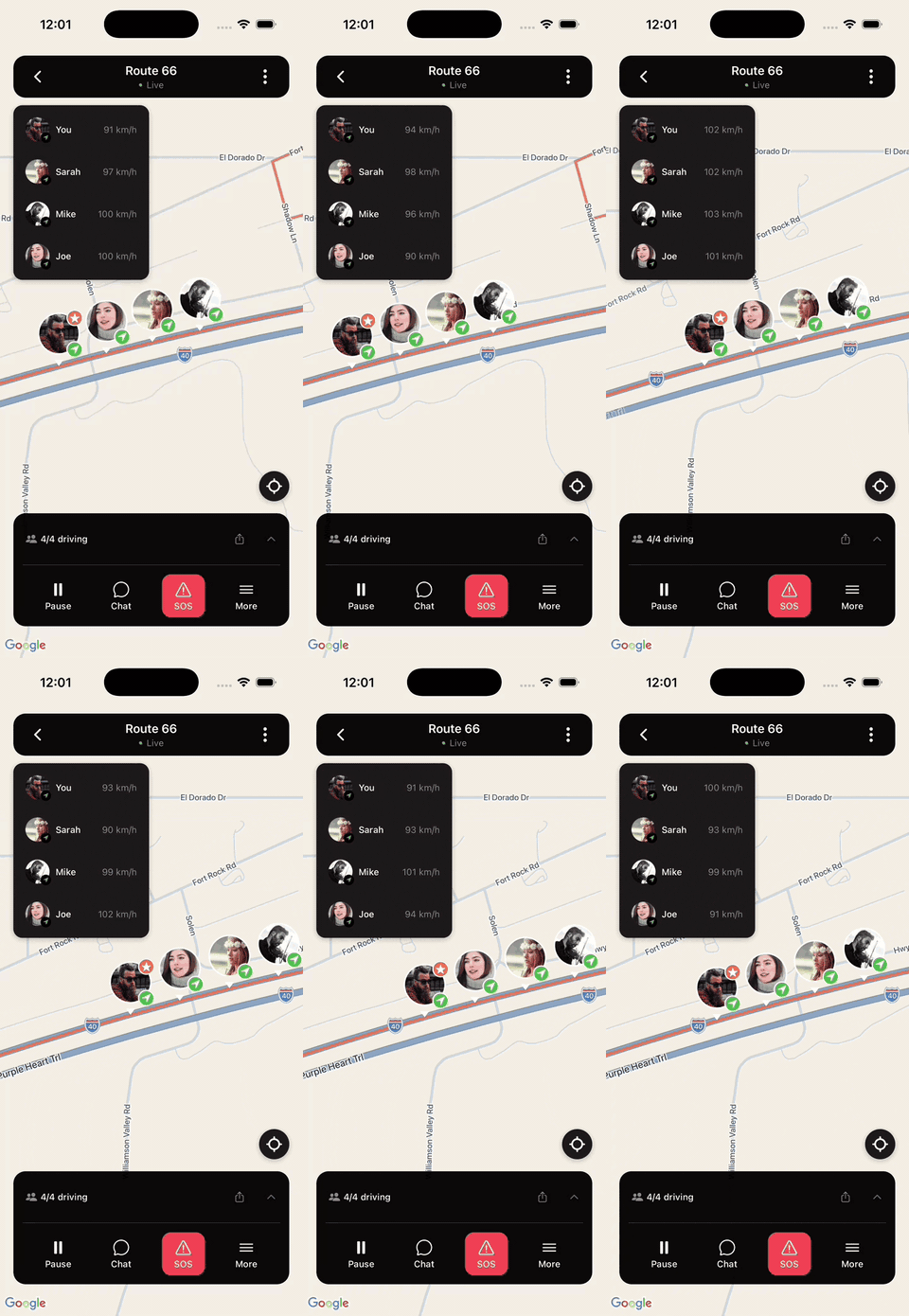
Drive-scoped means the sharing session is the trip. Everyone joins one map, the map runs while the group moves, and it closes when the drive ends. Group-driving apps like Vamio work this way: the crew joins a single drive by invite link with no sign-up, and location is accessed only during that active drive — sharing stops when it ends, with no background tracking, no data sale, and no ads (how we handle safety and privacy). The free plan puts up to 20 people on one live map at $0, and bigger events split into parallel drives. An hour-long drive uses roughly 5–10 MB of data. There’s in-drive chat and a one-tap SOS that sends your exact location to everyone in the drive, on iOS 16+ and Android 10+.
How do you set up temporary group sharing before a trip?
Do it the night before, not in the parking lot with five engines running. Eight steps:
- Pick one method for the whole group — two apps means nobody sees everyone.
- Send the invite link the evening before, so late joiners aren’t a morning problem.
- Check the permission level — precise if you’re finding cars, approximate if not.
- Set the shortest duration that covers the trip; prefer a tool that ends itself.
- Confirm every phone is mounted and charging before anyone pulls out.
- Agree what happens if someone drops off the map — usually: drive on to the next regroup point.
- Agree the emergency signal so nobody invents one at speed.
- Name who ends the session if your tool needs a human to do it.
Step 8 is the one groups skip: a manual off switch needs an owner, or it becomes the abandoned share above.
How do you make sure sharing actually stopped?
Check it from the receiving side, not the sending side. Three checks, in order. First, open the app’s sharing screen and confirm the list of people you’re sharing with is empty — most apps keep this in settings rather than showing it on the map. Second, check your phone’s OS-level location permissions and see which apps still have “Always” access, since an app can be idle in your dock and collecting in the background. Third, ask one person in the group to look for you on their map; if you’re still visible, the share is still live regardless of what your own settings screen implies.
Do this once after any trip where you shared with people outside your household. It takes under a minute, and it’s the only step that verifies rather than assumes.
Share for the drive, not forever
Temporary group location sharing works when the tool ends the session for you, so pick for the off switch rather than the map. For the wider coordination problem, see how to keep a group together on a road trip, or compare the tooling in walkie-talkies vs group chat vs apps. If you’re weighing continuous family tracking against event-based sharing, our Life360 alternative page lays out the difference.
Vamio is a free group-driving app for road trips, convoys, and car meets on iOS 16+ and Android 10+ — start a drive, send one invite link, and the crew joins with no sign-up. Location is shared during the drive and stops when it ends. Download Vamio, or read more about who we are first.
